

Getting customers to leave reviews isn’t always easy, even when they’re happy with your product or service.
Without enough positive reviews, your business can look less trustworthy and may even struggle to rank in local search results.
The good news is that you don’t need to be pushy or tech-savvy to get great feedback from real customers.
In this guide, I’ll show you how I consistently get more customer reviews using simple, beginner-friendly tips that anyone can follow.
You’ll learn how to ask for reviews naturally, automate follow-ups, and display them beautifully on your website to attract even more buyers.
💡Quick Answer: How to Get More Customer Reviews
In a hurry? Here are quick tips you can apply immediately to start collecting more reviews:
Ask right after purchase or project completion. Customers are happiest and most likely to leave a review.
Send a friendly email reminder 7–10 days later using an automation tool like FunnelKit Automations (physical products) or Uncanny Automator (digital products).
Showcase existing reviews on your site with Smash Balloon to inspire new feedback.
Encourage ongoing engagement with loyalty programs, points, or small policy-compliant incentives.
Why Do Customer Reviews Matter?
Customer reviews are a big deal because they can shape how people see your business — and whether they decide to buy from you.
Here’s why they’re so important:
Build Trust and Credibility: When someone visits your website for the first time, they want to know if they can trust you. Honest reviews from real customers give instant reassurance.
Boost Your Local SEO: Reviews don’t just improve your reputation — they help Google notice you and recommend you to people in your local area. The more positive feedback you have, the higher your business can show up in local search results.
Increase Conversions With Social Proof: Reviews act like little nudges. When visitors see that others have had great experiences, they’re more likely to make a purchase, sign up, or reach out. It’s proof that your product or service really works.
For example, all of our partner brands showcase real user testimonials on their websites. This simple addition has helped them build trust, keep their audience engaged, and show that their products really deliver.
How to Create a Customer Review Form in WordPress
Before you start collecting reviews, you’ll need an easy way for customers to share their feedback. That’s where WPForms comes in.
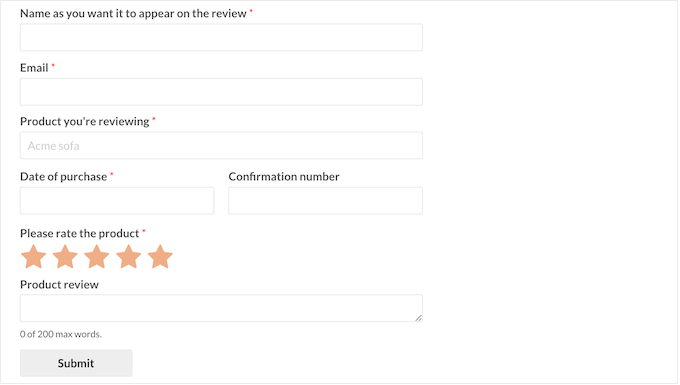
It’s hands down the best drag-and-drop form builder for WordPress. You can use it to create a customer review form in just a few minutes, complete with star ratings, comment boxes, and custom fields — all without writing a single line of code.
👉 To get started, check out our step-by-step tutorial on how to create a client feedback form in WordPress.
Once your form is ready, you’ll have a dedicated place for customers to leave their reviews — making the next steps of collecting feedback even easier.
With that in mind, let’s jump into my beginner-friendly tips for collecting more reviews. You can also use the links below to skip ahead to a specific tip:
12 Proven Tips to Get More Customer Reviews
Collecting reviews doesn’t have to be a guessing game. With a few simple strategies, you can make it super easy for customers to share their feedback.
I’ve put together 12 proven tips that have worked well for our partner brands and can work for you, too.
Let’s dive in and start turning happy customers into glowing reviews.
1. Ask Right After Completing a Purchase or Project
The best time to ask for a review is right after a customer buys something or you finish a project. That’s when they’re happiest and most willing to share feedback.
I’ve found that adding a review request to the thank-you page works surprisingly well. This is the page customers see immediately after placing an order, submitting a form, or booking a service.
It works great for WooCommerce stores, membership sites, online courses, agencies, photographers, and pretty much any business with a checkout or confirmation step.
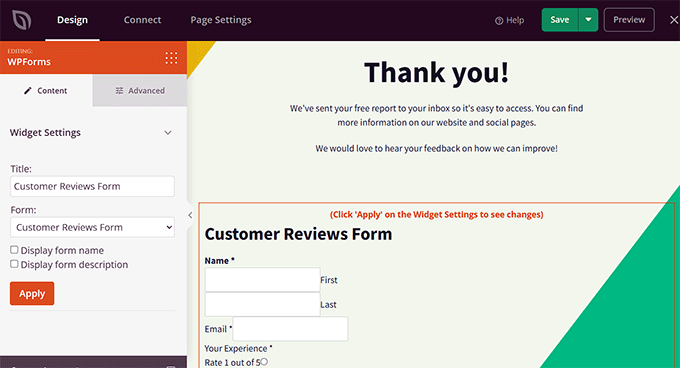
With SeedProd, you can create a custom thank-you page in just a few minutes. It is the best WordPress page builder that has ready-made templates and even includes a WPForms block for integrating your survey form.

This makes it super easy to embed your customer review form directly on the thank-you page, so customers can leave feedback without clicking a separate link.
If you are interested, take a look at our tutorial on how to create thank-you pages in WordPress.
Of course, not everyone will leave a review instantly — and that’s where automated emails help.
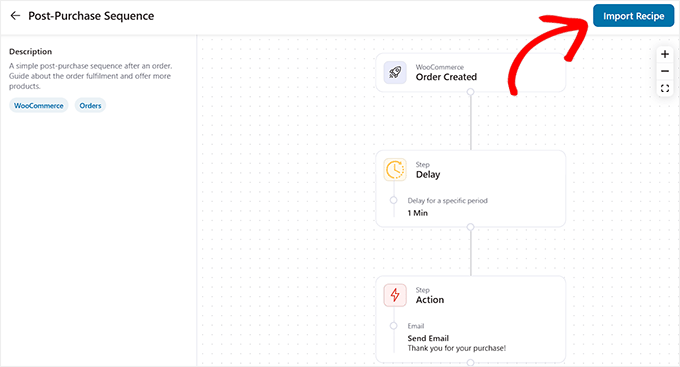
You can send a friendly thank-you message along with the customer’s receipt and include a quick review request. For WooCommerce stores, FunnelKit Automations is one of the best tools to do this.
It includes a pre-built post-purchase email sequence that lets you easily add a link to your review form. This keeps everything fully automated and reminds customers when they’re most likely to respond.
I recommend checking out our tutorial on how to create post-purchase surveys in WordPress to set this up step-by-step.
2. Request Reviews After Positive Customer Support Interactions
Some of the best reviews come from customers who have had a great support experience. Across our brands, we like to reach out right after resolving a ticket or when a customer praises our team because they’re happy, engaged, and much more likely to leave a review.
Several popular helpdesk plugins let you easily send review requests after positive customer interactions. For instance, with HelpScout, you can set up a simple workflow to follow up automatically after a ticket is resolved.
Tools like FollowUpThen let you schedule a friendly reminder to send a review request, so nothing slips through the cracks.
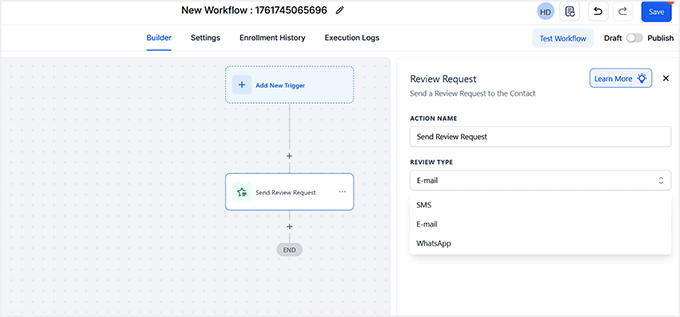
Other helpdesk platforms, like Zendesk, Freshdesk, and HubSpot Service Hub, offer similar features to automate this process.
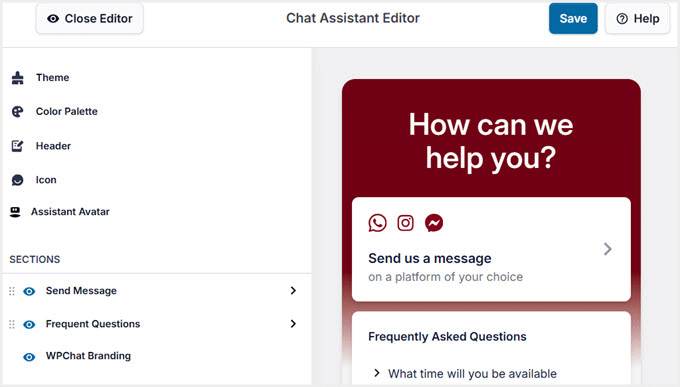
If your support includes live chat, then you can use WPChat — a powerful WordPress live chat plugin that lets your agents talk to visitors in real time using platforms like WhatsApp, Messenger, and Telegram.
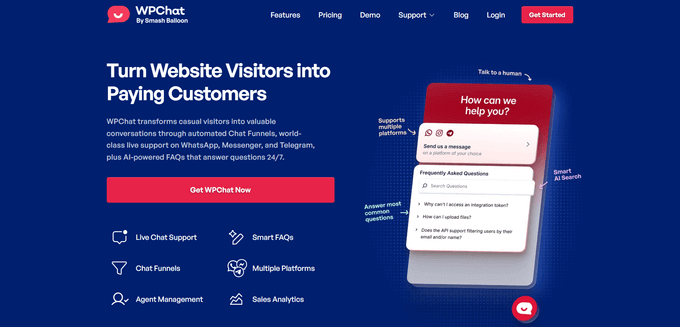
Your support agents can ask for reviews right after helping a customer and share a link to your review form instantly. Reaching out while the experience is still fresh makes customers much more likely to leave a thoughtful, positive review.
To get started with WPChat, see our guide on how to add free live chat in WordPress.
3. Follow Up a Few Days Later
Sometimes customers don’t leave a review immediately because they’re busy, distracted, or need a little time to experience your product. That’s why sending a gentle reminder 7–10 days after delivery can make a big difference.
By then, physical products have usually arrived, and digital products have had time to be used, so your customers can give more thoughtful, accurate feedback.
You can automate this process to save time. For WooCommerce physical products, I recommend FunnelKit Automations, which lets you create post-purchase email sequences with built-in review requests.
It’s a great choice because it can use your store’s shipping and delivery data to time the follow-up email perfectly.
For digital products, Uncanny Automator works great.
It connects with popular plugins and can trigger a review request after a user completes a course, downloads a file, or makes a purchase through Easy Digital Downloads.
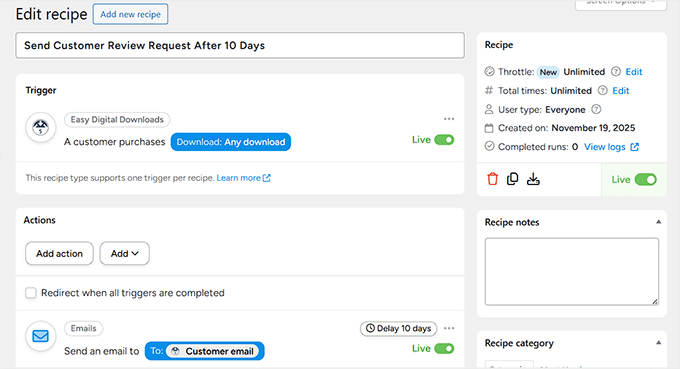
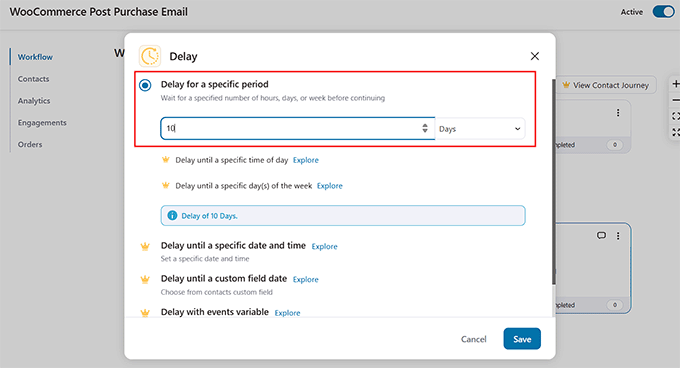
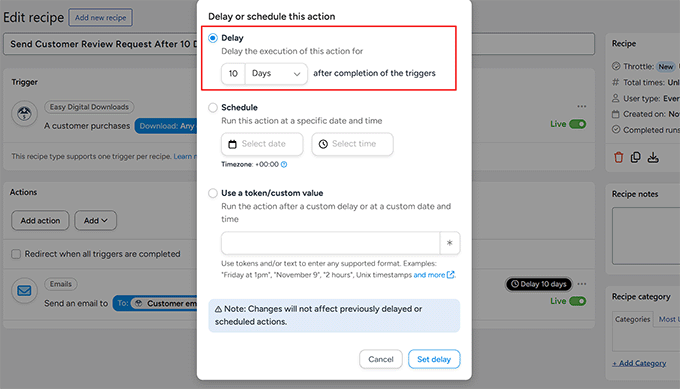
You can also easily add a delay between the trigger and the action by clicking the ‘Delay’ link in the recipe editor.
It opens a simple prompt where you can set how long to wait before the email is sent—for example, 3 days, 1 week, or a custom timeframe.
This ensures your follow-up hits at the perfect moment: after customers have had time to use your product, but while the experience is still fresh.
💡Pro tip: Keep your reminder friendly and short. A simple “We hope you’re loving your purchase! If you have a moment, we’d really appreciate your feedback” works wonders.
To find out how to do this, take a look at our tutorial on creating automated workflows in WordPress.
4. Add a Review Section in Customer Accounts
Another easy way to get more reviews is to let customers leave feedback directly from their account dashboard on your website.
I’ve noticed this works especially well on membership sites and online learning platforms, where users log in frequently and engage with your content over time.
Giving them a convenient spot to leave a review right inside their account increases the chances they’ll actually do it.
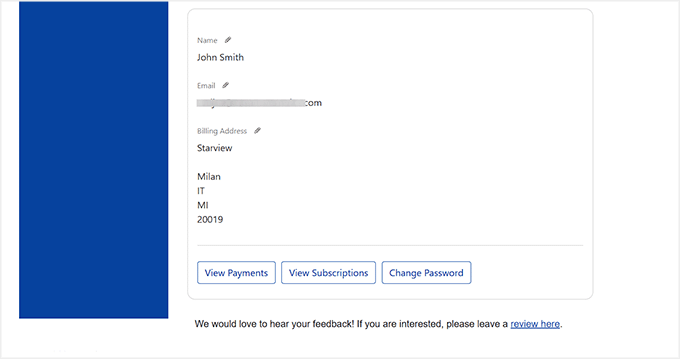
You can easily set this up in WordPress by opening the customer account page in the block editor. From there, just add a WPForms block with your review form.
For the best results, place it somewhere visible but not intrusive — for example, near the top of the dashboard, on a “My Account” or “Dashboard” tab, or under recent purchases or course progress.
If you don’t know how to do that, check out our guide on embedding WordPress forms.
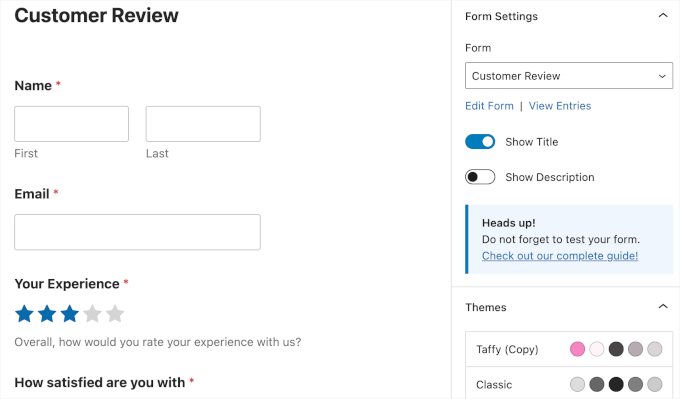
If you prefer, you can also link to the review form rather than embed it directly. This works well if you want to keep the dashboard clean or direct users to external review sites like Google, Yelp, or Facebook.
5. Add Review Links to Email Signatures and Order Receipts
One of the easiest ways to get more reviews is to include a ‘Leave a Review’ link in your team’s email signatures.
Every email your team sends, whether it’s a support reply, invoice, or general correspondence, becomes an opportunity to remind customers to share feedback.
This works because it’s subtle, consistent, and reaches customers naturally without feeling pushy.
You can set this up quickly in Gmail (or most email clients) by going to the Settings page and scrolling down to the ‘Signature’ section. Then, create a short, friendly line like:
“Enjoying your purchase? We’d love your feedback! [Leave a Review]”
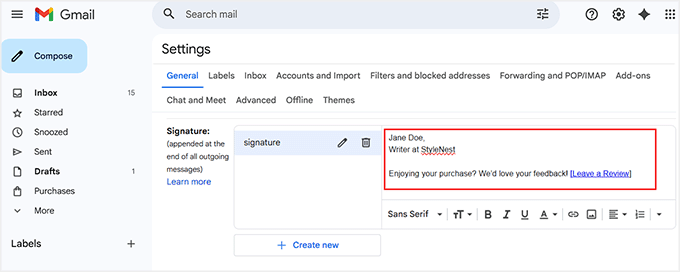
💡Pro Tip: I recommend using the WPBeginner Email Signature Generator to create a polished signature for your team.
While the free tool doesn’t have a built-in field for review links, you can add other information like your name, title, and social profiles, then copy and paste the generated signature into Gmail.
Once in Gmail, simply edit it to include your review link. This way, you get a professional-looking signature that also encourages reviews.
Another great spot for review requests is order receipts. Customers usually check their receipt right after a purchase, so it’s the perfect time to remind them you value their experience.
A quick, friendly prompt can encourage them to leave feedback while the experience is still fresh.
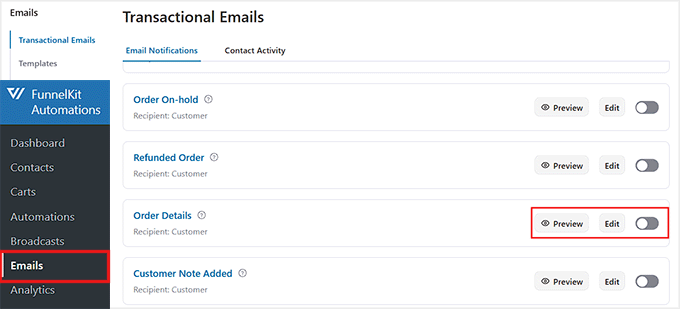
If you’re using FunnelKit Automations, it automatically creates an order details email notification for WooCommerce. You can easily customize this email to include your review request.
Simply go to the FunnelKit Automations » Settings » Emails page from the WordPress dashboard and click the ‘Edit’ link next to the ‘Order Details’ option.
This will open the email editor, where you can drag a ‘Text’ block right after the order details, and add your review sentence with a link to your feedback form.
Once you’re happy with it, click ‘Save’ to store your changes.
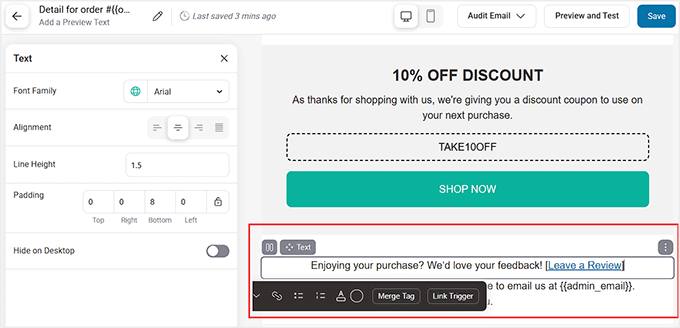
Then, go back to the Emails page and toggle the switch next to ‘Order Details’.
FunnelKit will automatically send your order receipt emails with the review link now included. This makes it effortless to turn every purchase into an opportunity for feedback.

6. Use QR Codes to Make Leaving Reviews Effortless
If you have customers who interact with your business offline — like in-store shoppers, event attendees, or people receiving physical products — then a QR code can make leaving a review super easy.
You could print the QR code on receipts, packaging, brochures, or even flyers. When customers scan it with their phone, they’re taken directly to your review form or landing page, making the process quick and effortless.
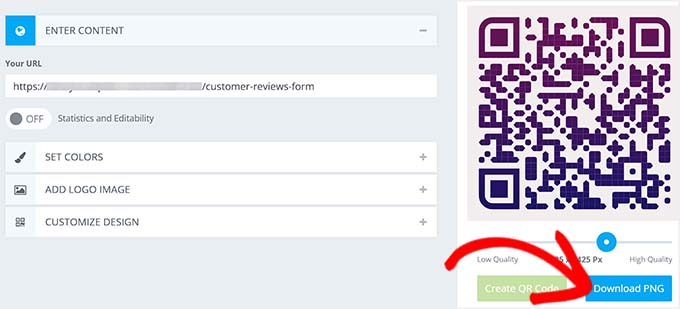
A tool I like for this is QRCode Monkey. It’s completely free and lets you create a QR code that links to any URL.
To use it for reviews, you need to first create a dedicated customer review page. Once your page is ready, just copy its URL and paste it into the QR code generator.
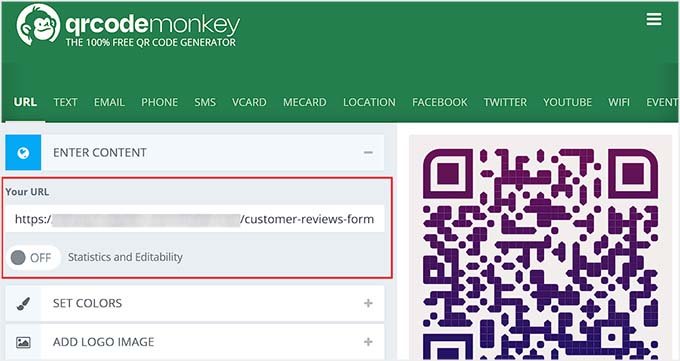
It will create a scannable QR code that takes customers straight to your review form. You can download the QR code by clicking the ‘Download PNG’ button.
Then add the QR code somewhere noticeable, such as at the bottom of receipts, on product inserts, or in a brochure.
I also recommend adding a short prompt nearby, like ”Scan here to leave a quick review — it only takes a minute!‘, to draw attention and encourage customers to actually take action.
This simple step turns even offline interactions into valuable opportunities for feedback.
7. Showcase Reviews Prominently on Your Website
You should make sure your customer reviews stand out and catch visitors’ attention as soon as they land on your website.
For the best results, I recommend placing these reviews on your homepage, product pages, and even the checkout page to build trust at key decision points.
When visitors see authentic, positive testimonials, they’re reminded that other people are sharing their experiences, which often motivates them to add their own review.
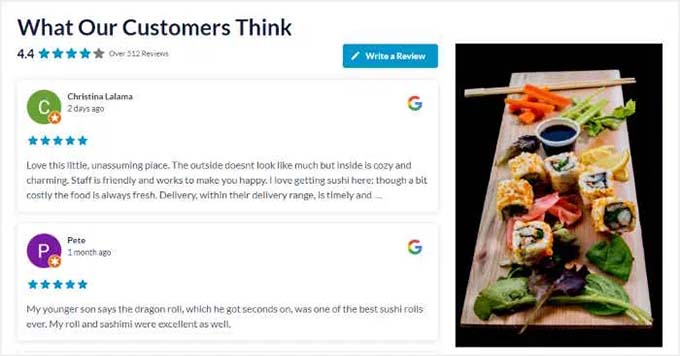
For WordPress users, Smash Balloon Reviews Feed Pro is the best reviews plugin for managing and displaying customer reviews.
It gives you full control over which reviews appear, lets you filter by star rating, and offers flexible display options, such as carousels or grids.
This makes it easy to showcase reviews in a professional, engaging way without touching a single line of code.
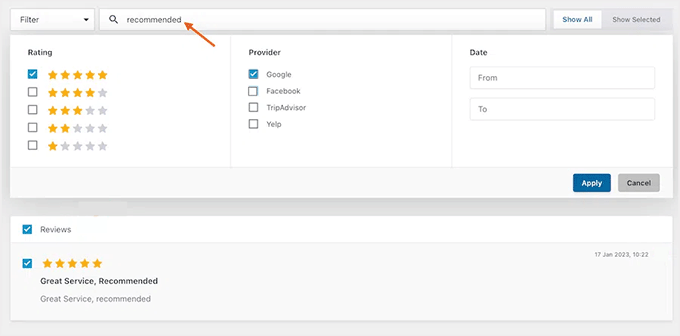
For step-by-step instructions, see our guide on displaying Google, Facebook, and Yelp reviews in WordPress.
💡Alternative: If you want to collect and display reviews from your own customers rather than just social platforms, then Thrive Ovation is a solid option. It integrates smoothly with WordPress and provides similar customization features for managing testimonials.
For details, see our complete Thrive Ovation review.
Another easy way to increase the number of reviews you get is by asking visitors at the right moment. On-site popups let you target engaged users, so you can collect quick feedback without interrupting their experience.
You can trigger these popups based on time spent on a page, scroll depth, or when a visitor views specific product pages. This ensures you’re only asking users who are already interested, which leads to more reviews and higher-quality responses.
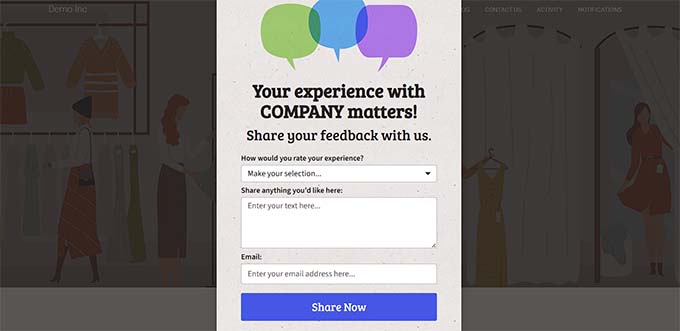
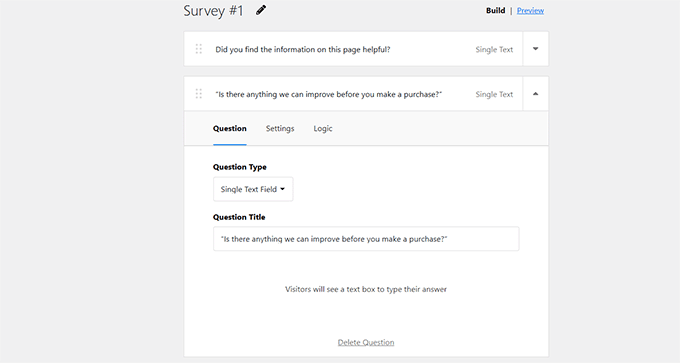
UserFeedback is one of the best survey plugins for this purpose, and it’s the tool I recommend if you want a quick, non-intrusive popup that blends naturally into your site.
You can create simple star ratings, short questions, or lightweight surveys, and place them on the pages that matter most.
If you want to see how it works, you can follow our step-by-step tutorial on how to create a survey form in WordPress.
For more control over who sees your popups—and exactly when—OptinMonster is the better fit. It includes advanced targeting rules such as scroll-depth triggers, page-level display, device targeting, and exit-intent detection.
This makes it ideal for stores that want to personalize review requests based on user behavior or show popups only during key moments in the buyer journey.
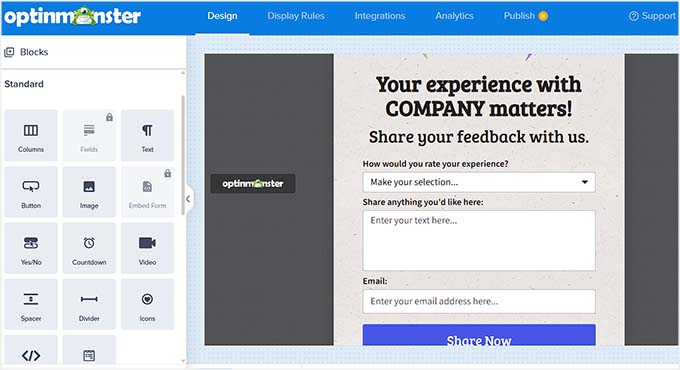
To dive deeper into what’s possible, you can check out our full guide on how to create popups in WordPress.
💡 Pro Tip: When creating on-site review popups, keep the questions short, clear, and easy to answer. For example:
“How satisfied are you with your purchase?”
“Would you recommend us to a friend?”
“What’s one thing we could improve?
9. Offer Incentives to Encourage Reviews
Giving customers a little nudge can go a long way when it comes to collecting reviews, but you don’t have to offer money to make it effective.
I’ve found that non-monetary incentives work really well and feel natural for both your business and your customers. Think along the lines of early access to new products, exclusive content, or special recognition in your community.
📌Important: When offering incentives, make sure to do so only for reviews collected on your own website.
Third-party platforms like Google, Yelp, and Trustpilot have strict rules against incentivized reviews, so offering rewards there can put your business at risk.
Instead, focus on creating small perks or recognition for customers who leave feedback directly on your site, keeping everything transparent and compliant.
If you want to go the coupon or discount route, you can set up rewards for leaving a review without violating platform rules.
Tools like WooCommerce Points and Rewards let you give points for actions such as writing a review, which customers can later redeem for discounts.
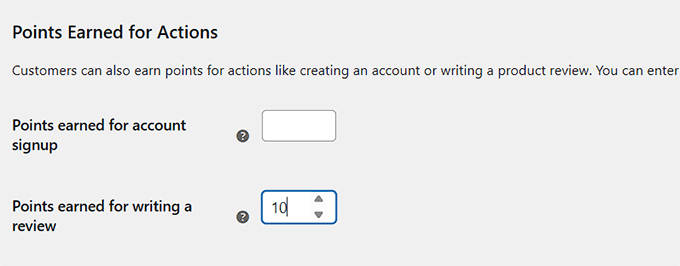
For stores that want a purpose-built solution, Loyalty Program by Advanced Coupons is my top recommendation. It’s specifically designed to reward customers for leaving reviews, as well as for other actions such as purchases or social shares.
You can easily create custom reward rules, track points, and automate notifications to let customers know when they’ve earned something for their feedback.
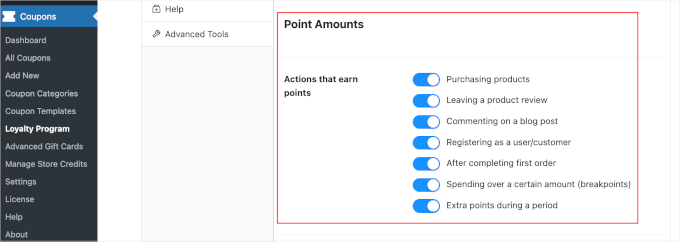
To get started, see our tutorial on how to create a loyalty program in WooCommerce.
10. Encourage Reviews on Social Media
Social media is a great way to get more reviews while also engaging your audience. I’ve found that when you ask followers to share their experiences in a friendly way, it not only encourages participation but also strengthens your community.
You can run simple campaigns asking people to leave a review or share a story about how they use your product.
Alternatively, you can run interactive campaigns with RafflePress. This powerful giveaway plugin allows you to create contests or giveaways that encourage followers to leave reviews, share posts, or engage with your content.
You can set up simple rules, track entries, and even integrate it with email marketing tools.
For example, you could run a “Share Your Experience” campaign where participants submit a review or testimonial to earn a chance to win a small prize. This creates a fun, non-intrusive way to boost reviews and engagement.
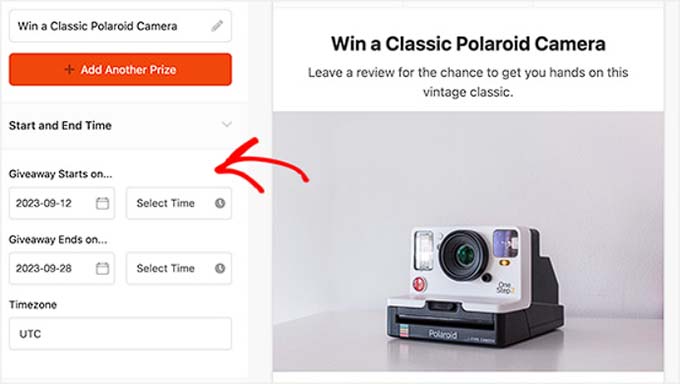
For step-by-step instructions, take a look at our tutorial on how to run a social media contest to grow your site.
11. Collect Video Testimonials
Video testimonials are one of the most powerful ways to build trust with potential customers. When people see real customers talking about their experience, it creates an instant connection and makes your product or service feel more authentic.
You can reach out to your top customers and ask them to submit short video reviews. These videos can then be displayed on your homepage, sales pages, or dedicated testimonial pages to boost credibility and encourage more purchases.
To make collecting videos easy, WPForms is a great choice. You can create a simple upload form where customers can submit their videos directly from your website.
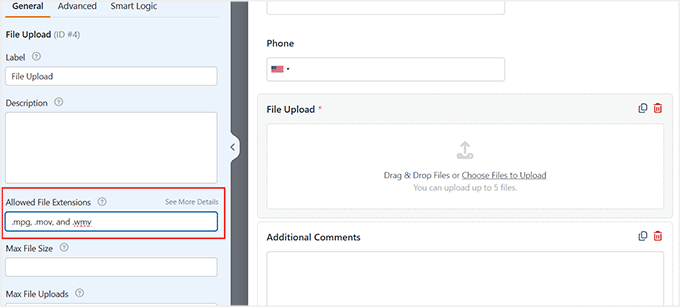
However, uploading videos directly to WordPress can put a heavy load on your server, especially on shared hosting. That’s why I highly recommend using the Google Drive or Dropbox addons offered by WPForms.
Once activated, these addons connect your website to your preferred cloud storage, and all videos submitted by your users are safely saved there.
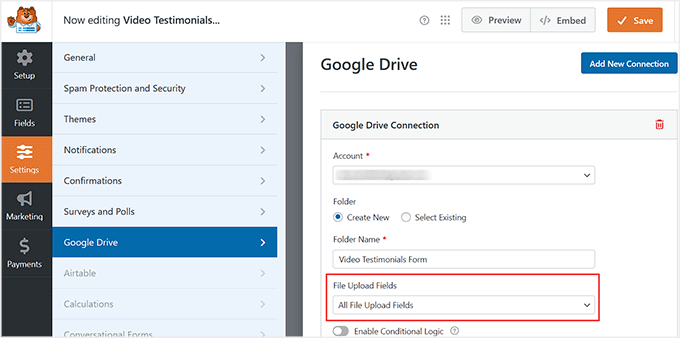
This setup keeps your website running smoothly while making it easy to manage user-submitted videos. You can then select the best ones from your storage to display on your reviews page so that visitors can watch them.
💡Pro tip: Short, authentic videos usually perform better than long, overly polished ones. Encourage customers to speak naturally about their experience and highlight one or two things they loved most about your product or service.
12. Track and Improve Your Review Strategy
Collecting reviews is great, but understanding what’s working—and what’s not—is where the real magic happens. I always make it a point to monitor how many reviews I’m getting, where they’re coming from, and which products or pages are generating the most feedback.
This helps me fine-tune my timing, messaging, and tools to achieve even better results over time.
MonsterInsights is my go-to tool for tracking review submissions in WordPress. By integrating it with your WordPress forms or popups, you can see which pages drive the most reviews, identify trends, and uncover which campaigns are truly effective.
It’s also the easiest way to set up Google Analytics without touching a single line of code, giving you reliable insights without the headache.
If you want a full walkthrough, check out our guide on how to set up WordPress form tracking in Google Analytics.
Beyond numbers, it’s equally important to listen to the feedback in the reviews themselves. Customers often share valuable insights, suggestions, or pain points you might not hear anywhere else.
Acting on this feedback not only improves your products or services but also shows your customers that you genuinely care, which can encourage even more positive reviews in the future.
By combining analytics with active listening, you can continuously refine your review strategy, make smarter decisions, and turn customer feedback into a powerful growth tool.
❌ Common Mistakes to Avoid When Asking For a Review
Getting more customer reviews works best when the process feels natural.
I’ve noticed a few mistakes that can make it harder to get feedback, so here’s what to watch out for:
Asking Too Soon or Too Often – If you ask a customer for a review before they’ve had enough time to experience your product or service, they may not have much to say. Waiting a few days or a week can lead to more thoughtful, helpful feedback.
Offering Direct Monetary Rewards – Giving money or gift cards for reviews can violate the rules on third-party platforms like Google or Yelp. However, offering small incentives, such as loyalty points or discount coupons, for reviews collected directly on your website is a common and acceptable practice.
Using Automated Messages Without Personalization – I’ve found that reviews get much better responses when you add a personal touch, like mentioning the customer’s name or the product they bought. A simple, friendly note goes a long way.
Making it Hard For Customers to Leave Feedback – Long or confusing forms, missing links, or unclear instructions can stop customers from leaving a review, even if they want to. Keep your process simple and easy to follow.
Failing to Follow-Up – Sometimes, a gentle reminder a few days after a purchase or service can make a big difference. Following up shows you value their feedback and gives customers another chance to leave a review.
Focusing on these points will help you collect more honest, helpful reviews without making customers feel pressured.
🤝 How to Handle Negative Reviews Gracefully
Even if you follow all the best practices, sometimes reviews won’t be positive. Negative feedback happens to every business, and it’s completely normal.
The key is how you respond. Handling criticism gracefully can actually turn a tricky situation into a win for your brand and even encourage more customers to share their experiences.
Here are some tips:
Stay Calm And Professional: It’s easy to feel defensive, but responding politely and thoughtfully shows that you value feedback. A friendly, composed response speaks volumes to both the reviewer and anyone else reading your reviews.
Offer to Resolve The Issue Privately: Suggest moving the conversation to email or direct messages to fix the problem. This keeps the discussion constructive and helps avoid public back-and-forth that could escalate.
Once Resolved, Ask if They’d Consider Updating Their Review: After the customer’s concern is addressed, politely invite them to revise their review to reflect the updated experience. Many are happy to do so when they see the effort you put into resolving the issue.
I’ve found that responding to negative reviews with empathy and a clear solution not only helps repair the relationship but also shows other customers that you genuinely care.
Using a customer support plugin can make this process much easier. These tools let you track tickets, respond quickly, and even set up workflows to follow up after issues are resolved.
If you want, check out our guide on the best customer support plugins for WordPress to see the top options for managing support efficiently.
Frequently Asked Questions About Collecting Customer Reviews
Even with all these tips, you probably still have a few questions.
I’ve answered the most common ones I get from business owners, keeping it simple and actionable:
Is it legal to offer rewards for reviews?
Yes, but only if you are collecting reviews on your own website and clearly disclose it.
Offering rewards for reviews on third-party platforms like Google, Yelp, or Trustpilot is against their rules and can result in penalties. Stick to site-hosted reviews for incentivized programs.
How many reviews should I get per month?
Focus on consistency rather than quantity. Even adding 5–10 new reviews each month can help improve your search rankings and gradually build trust with potential customers.
How do I ask for reviews naturally?
The key is to be friendly and personal. For example, sending a message like, “Your opinion helps others — would you mind sharing your thoughts?” feels more genuine than a generic automated request.
Where should I focus on getting reviews first?
Start with platforms that directly affect your visibility, such as Google Business Profile and Facebook. Once you have a solid foundation there, you can expand to industry-specific sites like Tripadvisor, Trustpilot, or other niche review sites relevant to your business.
Remember, any incentives should only apply to reviews on your own website, not third-party platforms.
What’s the best way to handle negative reviews?
Always respond politely, acknowledge the customer’s concern, and offer to resolve the issue offline. Using tools like WPForms or UserFeedback can help you collect private feedback before it becomes a public complaint, which often turns unhappy customers into satisfied ones.
I hope this article helped you learn how to collect more customer reviews for your business. You may also want to see our guide on how I turned my WordPress.org reviews into social proof and our top picks for the best customer service tools.
If you liked this article, then please subscribe to our YouTube Channel for WordPress video tutorials. You can also find us on Twitter and Facebook.