

Server speed and conversions are directly linked: slow servers kill momentum, trust, and sales. Even small delays cost real revenue, especially on mobile. Modern infrastructure like NVMe storage, optimized server software, and layered caching creates the speed your funnel depends on. When hosting is fast, every part of your site performs better. When it’s slow, everything suffers. Upgrade hosting, remove bottlenecks, and conversions rise.
Speed is one of the first places to look when improving conversions. You might adjust your CTA, rewrite your headline, or update the layout, but if your pages take too long to load, those improvements never matter. Users leave before they see them.
Page speed plays a crucial role in conversion rates, especially on mobile where attention is short and expectations are high. Today’s users expect a near-instant response. Anything less feels broken or unprofessional.
Even small delays create real problems. Research shows that when your page slows by even a fraction of a second, fewer visitors stay long enough to browse or buy. A 10% drop in speed can lead to a 4% decrease in sales and roughly 2% fewer conversions. For a site generating $100,000 monthly, that’s $4,000 in lost revenue every month.
Many teams know this yet struggle to explain why their site is slow or how hosting affects it. Page speed depends on many factors: frontend code, plugins, images, and themes. But your hosting environment shapes nearly every part of the experience. If your server can’t respond fast enough, everything else slows down and your conversion rate suffers.
This article connects hosting performance to the business results you care about. You’ll learn how page speed affects conversions, how to diagnose bottlenecks, and how infrastructure choices like NVMe storage, caching layers, and server software influence results. You’ll also see real examples of sites that improved engagement by fixing speed problems at the hosting layer.
By the end, you’ll know what to look for, what to fix first, and how to choose the right hosting environment to support growth.
Why Speed Aligns With Growth
When your brand promises to deliver value quickly and consistently, page speed becomes part of the experience itself. Fast-loading sites feel intentional and professional. They show customers you care about their time and run a stable, trustworthy operation. Slower sites send the opposite message: something is off, or the business isn’t prepared for its traffic.
This is where strong hosting matters. Fast, dependable infrastructure helps brands deliver what they promise. When pages load smoothly during traffic surges or busy seasons, you protect trust and avoid lost sales. Think about Black Friday or a major product launch. If your site buckles under pressure, you don’t just lose immediate sales, you damage relationships with customers who may never return.
Brands that want to grow without limits need an environment built to support that growth, especially under load. This means choosing infrastructure that can scale seamlessly, maintain performance during unexpected spikes, and provide the technical foundation for speed at every layer.
How Site Speed Shapes User Behavior
Why Delays Lead to Lost Conversions
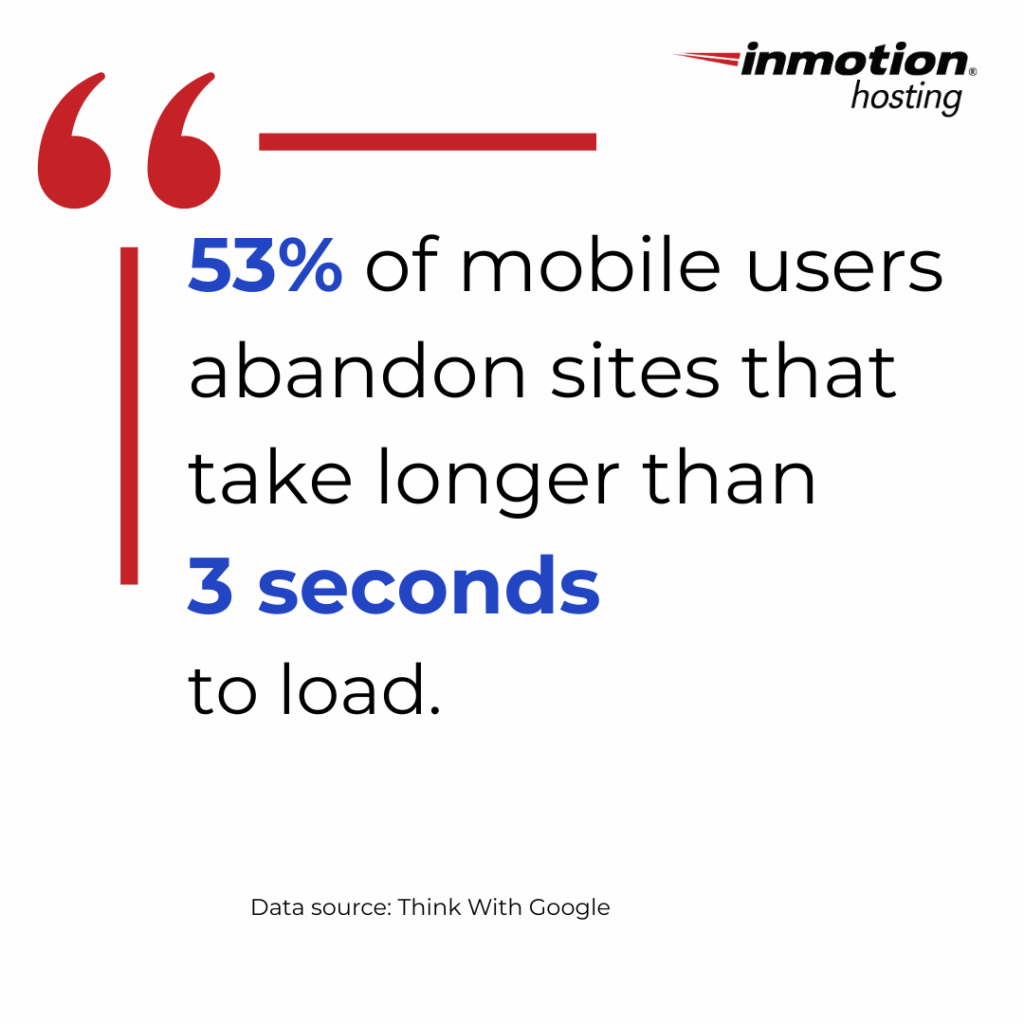
When visitors land on your site, they expect it to load without delay. Research shows that 53% of mobile users abandon sites that take longer than three seconds to load. That’s more than half your potential audience gone before they see your first headline.
Users compare your site to the fastest ones they’ve used, not just direct competitors. They compare you to Google, to Amazon, to the most optimized sites on the internet. When loading feels slow, confidence drops. They question whether the site works properly or whether they should search for an alternative.
Longer wait times increase bounce rates, reduce page views, and limit how many people reach your most valuable screens. Each delay is a moment where you’re asking users to invest more patience, and patience is a finite resource.
This is even more noticeable on mobile. Small delays feel bigger on a phone. A two-second delay that might be tolerable on a desktop feels interminable on mobile. Mobile networks can’t hide slow server response times the way fast desktops sometimes can.
The psychological impact of speed is profound. Fast sites feel effortless. Users flow from page to page without thinking about the technology. Slow sites make users aware of the machinery behind the experience, breaking immersion and trust.
Why Speed Appears in Every Conversion Checklist
Marketers and developers often include speed in their top three suggestions when fixing conversion problems. That’s because faster pages improve multiple dimensions of the user experience simultaneously.
First impressions happen in milliseconds. Before users process your headline or understand your value proposition, they’ve already formed an impression based on how quickly your site responds. A fast-loading page signals professionalism and reliability. A slow page creates doubt before users read a single word.
Funnel completion rates improve dramatically with speed. Every step in a conversion funnel is an opportunity for users to abandon. If each step loads quickly, users maintain momentum. If each step introduces delay, abandonment increases. Studies show that even a one-second delay can reduce conversions by 7%. For a multi-step checkout process, those delays compound.
Mobile performance is critical because mobile now represents the majority of web traffic for many sites. Mobile users are often in high-intent situations: researching products while in stores, looking up information on the go, making quick purchase decisions. They need speed even more than desktop users because they have less patience and more distractions.
Search engine visibility depends partly on speed. Google has explicitly stated that page speed is a ranking factor, particularly for mobile search. Faster sites rank higher, all else being equal. This creates a virtuous cycle: better hosting leads to faster speeds, which leads to better rankings, which leads to more traffic and conversions.
User confidence grows with consistent performance. When users visit your site multiple times and experience fast loading every time, they begin to trust that your operation is professional and reliable. This trust transfers to their perception of your products, services, and brand.
Nothing slows momentum faster than waiting. When your site responds quickly, it creates flow that encourages visitors to keep exploring. They click on another article, browse another category, add another item to their cart. Each action feels effortless, so they keep taking actions.
The Role of Brand Elements in Speed Perception
Visual Identity and Trust
Your design sets expectations before users consciously evaluate your content. Clean, modern layouts make users assume the site will feel modern and quick. When your visuals communicate clarity and energy, slow load times stand out because they contradict what your design promises.
A fast site reinforces your identity by matching how the brand feels. If your brand emphasizes energy and dynamism, fast loading supports that perception. If your brand emphasizes reliability, consistent speed demonstrates those values in action.
Voice and Clarity
If your tone is simple and direct, the experience should match. Slow speed breaks the sense of clarity your voice creates. A fast site supports a brand that speaks confidently and helps users make decisions quickly.
Content Delivery and Stability
Content needs to appear instantly for users to engage. If images load late, if product cards pop into place seconds after the page appears, or if layouts shift as elements load, the experience feels unstable.
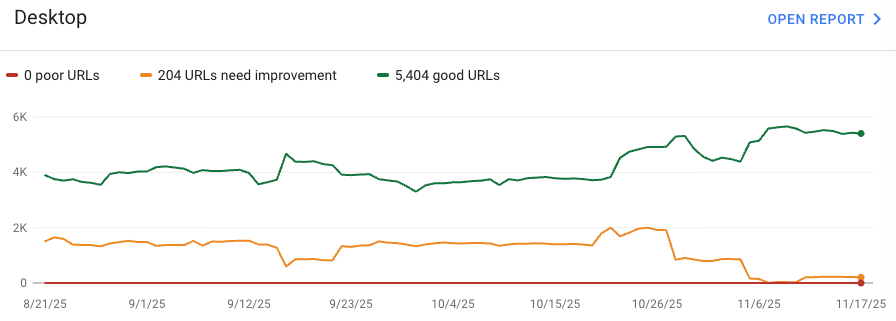
This is why Google’s Core Web Vitals matter. They track whether content becomes visible and interactive predictably. Hosting plays a large role here, especially in Time to First Byte (TTFB) and Largest Contentful Paint (LCP). TTFB is almost entirely determined by your hosting environment’s ability to process requests and start sending responses.
UX and Friction Removal
Good UX removes friction from every interaction. Slow hosting adds it back. When your infrastructure keeps load times low, your UX shines. Users focus on your content, products, and message, not on waiting.
What Hosting Does for Page Speed and Conversions
Real-world test data shows that hosting speed comes from a blend of storage technology, server software, caching layers, and scalability. These aren’t independent factors. They work together to create overall performance. Understanding each component helps you make informed decisions about hosting infrastructure.
Storage Type: NVMe SSDs
Storage technology is fundamental to hosting speed. Traditional hard drives use mechanical parts that create latency. SATA SSDs improved this with flash memory but still use an interface designed for hard drives.
NVMe (Non-Volatile Memory Express) drives use the PCIe interface designed specifically for fast flash storage. This directly improves TTFB because every page request involves reading data from storage. With NVMe, those operations happen so quickly they become essentially negligible. NVMe also reduces delays during peak traffic when many users hit your site simultaneously.
Server Software: LiteSpeed, NGINX, Apache
Server software controls how your web server handles incoming requests. Apache uses a process-based model where each connection gets its own process or thread. Under heavy load, this uses significant resources.
NGINX improved on Apache with an event-driven architecture that can handle thousands of simultaneous connections within a single process, making it much more efficient under load.
LiteSpeed goes further with built-in caching optimized for WordPress and support for HTTP/3 and QUIC protocols. On real WordPress sites, LiteSpeed and properly tuned NGINX stacks consistently deliver faster render times than default Apache setups.
Caching Layers: Object Caching and CDN Delivery
Modern high-performance hosting uses several types of caching working together. Page caching stores final HTML output so future requests can skip the entire page generation process. Object caching stores database query results and expensive computations in memory. Opcode caching stores compiled PHP code so the server doesn’t need to recompile files on every request.
CDN (Content Delivery Network) delivery spreads static files across servers worldwide. Users download files from the closest server, reducing latency.
These layers work together to minimize server load and maximize response speed, resulting in consistently fast performance.
Hosting Environment: Shared vs. VPS vs. Dedicated
The hosting environment determines whether you have guaranteed resources or must share with other sites. Choosing the right hosting type for speed depends on your traffic patterns and performance requirements.
Shared hosting places many sites on a single server, all sharing CPU, memory, and I/O capacity. This is economical but creates unpredictable performance. If another site gets a traffic spike, your site slows down.
VPS (Virtual Private Server) environments partition server resources, giving each VPS guaranteed allocation. Your performance becomes predictable because you’re not competing with other sites.
Dedicated servers give you an entire physical server with complete control. Cloud hosting adds elasticity to the VPS model, allowing resources to scale based on demand.
Sites with variable traffic or those under pressure during launches need environments that can scale without slowing down.

Understanding Real Benchmarks
Independent analysis and comprehensive hosting performance comparisons across GTmetrix, TechRadar, and WPBeginner show consistent patterns:
NVMe-powered environments show faster TTFB
LiteSpeed and optimized NGINX stacks produce faster LCP
Hosting with built-in caching delivers more consistent load times
VPS and dedicated environments outperform shared during traffic spikes
Two similar sites can perform differently even when built the same way. The hosting infrastructure creates a performance baseline that everything else builds upon.
Real-World Scenarios Linking Speed and Conversions
Agencies Handling Multiple Client Sites
One digital agency running twenty+ client websites struggled during campaign peaks. Beautiful sites with clean code slowed down whenever clients ran major campaigns on older SATA-based shared hosting.
After moving to NVMe-powered VPS plans, average load time dropped from 2.5 seconds to under one second. This improved client satisfaction, reduced emergency troubleshooting, and freed the team for higher-value work. The migration paid for itself within two months through reduced support time alone.
eCommerce Stores Fixing Abandoned Carts
An outdoor equipment store saw strong traffic from paid ads but disappointing mobile conversion rates. Testing revealed pages took nearly three seconds to load, which was particularly problematic for cart and checkout pages requiring database queries.
Moving to NVMe hosting with UltraStack caching and CDN integration dropped load times below one second. Conversion rates jumped 20%, bounce rates dropped 35%, and the store passed Google’s mobile performance thresholds. The hosting upgrade cost $80 more monthly but generated over $4,000 in additional revenue.
Founders With High Bounce Rates
A solo creator’s teaching site ranked well for educational keywords but had short sessions and high bounce rates. The site looked good but loaded slowly due to shared hosting struggling with WordPress.
Upgrading to LiteSpeed-powered managed WordPress with object caching reduced TTFB from 1,200ms to 400ms, a 66% improvement. Bounce rates improved 30%, average session duration increased from 45 seconds to two minutes, and course signups doubled.
These examples demonstrate how infrastructure changes directly impact engagement and revenue when content and design remain unchanged.
How to Choose Hosting That Improves Your Conversion Rate
What to Look For
Modern Infrastructure: Choose hosts with NVMe SSDs, LiteSpeed or optimized NGINX, and multiple caching layers including object caching and CDN integration. Check whether they use modern PHP versions. PHP 8.x is dramatically faster than older versions.
Reliable Uptime: Aim for at least 99.9% uptime backed by real monitoring and SLAs, not vague promises. Look for hosts with redundant systems: backup power, multiple network connections, and RAID storage.
Strong Support: Human support matters for diagnosing speed issues. Look for phone, chat, or ticket support from knowledgeable technicians. Read reviews specifically about support experiences.
Scalability: If traffic changes significantly, choose VPS or cloud hosting for consistent performance during demand spikes with resources that scale as needed.
Global Reach: For international users, CDN integration and regional data centers reduce latency. Built-in CDN integration is simpler and often performs better.
Transparency: Hosts that publish real test results or offer trial periods let you verify performance with your actual site before committing.
A Quick Diagnostic to Identify Bottlenecks
If your site is slow, systematic diagnosis helps identify where problems live. Different symptoms point to different solutions. Understanding common causes of website slowness helps you target the right fixes.

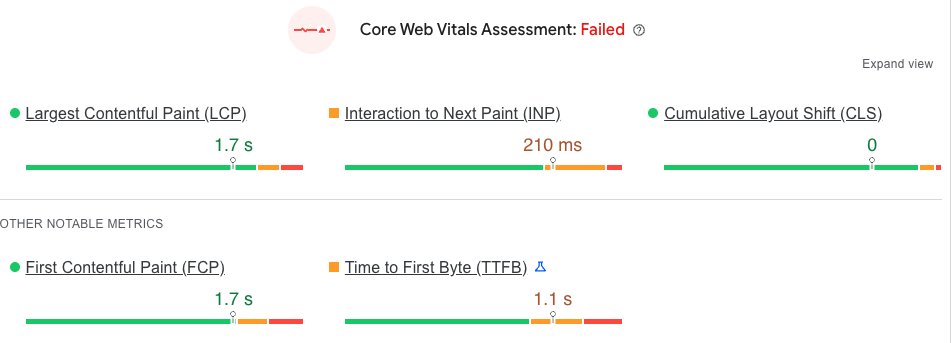
Is TTFB high? If Time to First Byte exceeds 600ms consistently, you likely have a hosting or server configuration issue. This is the time before any content reaches the browser, so front-end optimizations won’t help. The solution is better hosting or server optimization.
Are images oversized? If images represent most of your page weight and aren’t compressed or properly sized, you have a media optimization issue. This can be fixed with image compression tools, modern formats like WebP, and responsive images sized appropriately for different devices.
Are plugins heavy? If you’re running many plugins, especially poorly-coded ones, you might have excessive PHP execution time or database queries. Use performance profiling tools to identify which plugins consume the most resources, and remove or replace problematic ones.
Is your database overloaded? If you have years of accumulated data, revisions, spam comments, and transient options, database queries slow down. Regular database optimization and cleanup can help, as can object caching to reduce query frequency.
Are you far from your visitors? If your hosting is in one geographic region but you serve a global audience, latency is inevitable. The solution is CDN implementation to serve content from locations close to each user.
Tools like PageSpeed Insights, GTmetrix, and WebPageTest provide detailed breakdowns showing where time is spent during page loads. InMotion Hosting’s Website Performance Test offers specific hosting-focused insights, and our performance optimization resources provide actionable guidance for improving site speed.
The key is matching solutions to problems. Don’t optimize images if your real problem is slow hosting. Don’t upgrade hosting if your issue is actually unoptimized media or excessive plugins.
Last Thoughts
Fast pages lift conversion rates because they remove friction and keep visitors engaged, and hosting is often the biggest factor. When your site runs on modern infrastructure like NVMe storage, optimized server software, and layered caching, speed becomes consistent and measurable, not accidental.
Upgrading hosting is one of the most reliable ways to strengthen performance and fuel growth. It removes core bottlenecks, boosts conversions and search visibility, and gives businesses the confidence to scale without worrying about their infrastructure holding them back.